
IRB Study Closure
The Principal Investigator (PI) may close an active study under certain circumstances. The Institutional Review Board (IRB) and ORRC may also request suspension or termination of an active study under certain circumstances. The iRIS platform sends automatic notifications 90, 60, and 30 days prior to the study expiration date. If the study should be closed, then a request to close the study must be submitted by the PI in iRIS.
When to Close a Study
The PI is responsible for promptly closing out an active study if any of the following conditions exist:
- All participant accrual, research and clinical investigation activities, data analysis, and reporting activities are complete. The study may remain open and active if the only remaining activity is the analysis of the data. However, the data must be de-identified, and there should be no identifying links or codes to the de-identified data.
- The PI never initiated the study research and does not plan to initiate the research at this time.
- Participant accrual is finished, all data collection is complete.
- The PI plans to leave the University and intends to continue the research activities at another institution.
- The study has been open for a period of three or more years, and no participants have been enrolled in the study.
The PI cannot close out an active IRB study if:
- Participants are being followed.
- Identifiable data (including data with codes or links to identifiers) is still being analyzed.
It is recommended that a study closure request is submitted.
Submission Checklist
A complete submission increases the chance of approval. The following information should be included in an IRB study closure request:
- A complete IRB Renewal/Continuation Form. Responses should be clear and concise to improve readability and understanding. Complete all fields. Fields that are not applicable to the research should indicate this when possible.
- A final review report unless:
- The PI never initiated the study or;
- The study received initial/continuation review within the last six months, and no participants have been enrolled in the last six months.
Study Suspension or Termination
The IRB, or the ORRC in some cases, may suspended or terminated an active study under the following conditions:
- There has been no response from the PI to IRB requests in a 3-month period.
- If a study has been open for a period of three or more years and the PI has not enrolled participants in the study, the IRB may require study closure unless there are extenuating circumstances for keeping the study open (e.g., the study is about a rarely seen condition).
- Lapse of approval due to non-response to requests for continuation or final review.
Document Retention and Destruction
Signed documents, (e.g., signed consents/assents) and IRB records should be maintained for at least six years after study closure, taking measures to prevent accidental or premature destruction of these documents. Investigators must store records consistent with the plan approved by the IRB in a secure fashion to prevent breaches of confidentiality.
For research that falls under the authority of FDA or other regulatory agencies, the PI retains signed documents and IRB records for the period specified in the applicable regulations if the requirements are longer than six years after study closure. For multi-site studies, the PI consults with the study sponsor regarding retention requirements but must maintain records for a minimum of six years after study closure.
Retained records must be accessible for inspection and/or copying by authorized representatives of institutional or regulatory agencies.
Quick Links
Education and Resources
Education
Resources
Forms and Tools
- iRIS Platform
- Ethical IRB Guidelines and Principles
- GCP Training Requirement
- Guidance for Case Reports
- Guidance for Faculty and Research Staff
- Guidance on Recruitment Material
- Guidance: Student Research Guide
- IRB Charge Policy
- IRB SOP
- IRB SOP Supplement
- IRB SOP DoD Addendum
- Limited IRB Review
- Review of PHI-Related Protocols
- Template: Assent Form (Download)
- Template: Informed Consent Form (Download)
- Template: Interview Preamble (Download)
- Template: Survey Preamble (Download)
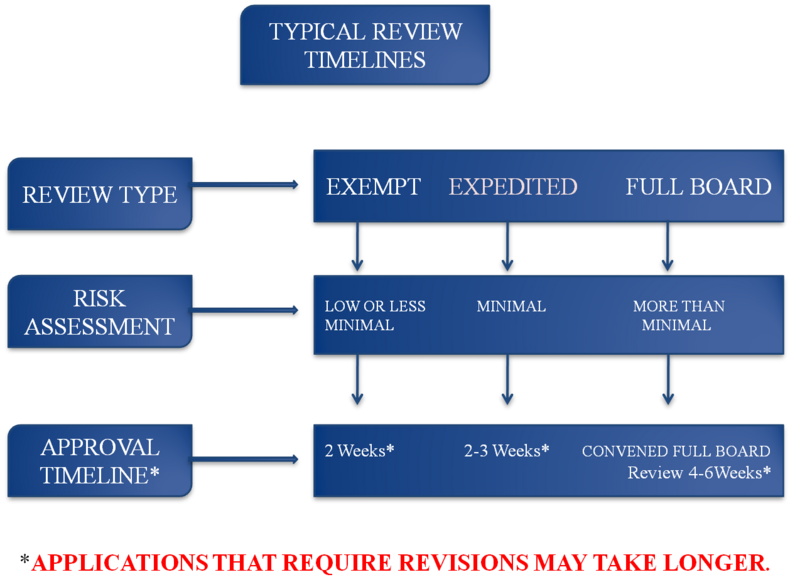
- Typical IRB Review Timelines
Links
- 45 CFR 46: The Common Rule | eCFR
- 21 CFR 50: FDA regulations on the protection of human subjects | eCFR
- 21 CFR 56: FDA regulations on Institutional Review Boards (IRBs) | eCFR
- A How to Guide: The Use of Social Media in Research | NIH
- Belmont Report
- Human Research Protection Program Resources | HHS
- Office for Human Research Protections (OHRP) | HHS
iRIS Access
The iRIS platform (also known as iMedRIS) is used to create and manage studies that require regulatory compliance review. All studies that require IRB approval must be submitted for review in iRIS. Howard University personnel and students who require iRIS access may request an iRIS account by completing the iRIS User Access Request Form. To provide iRIS access to non-HU study personnel, please contact the ORRC. For more information on how to access and use the iRIS platform, visit the iRIS section of this website.
eCompliance - iRIS